Introduction
The software is able to interrogate the live data held at Companies House via the Companies House "XML Gateway". The service is completely free and in order to use this service your PC will need to be connected to the Internet. If you have any security or firewall hardware or software, you may need to give permission for the software to access the Internet.
Scope of Data
| • | The following fields of information can be interrogated: |
| • | Company Name |
| • | Registered Office Address |
| • | Company Type |
| • | Place of Registration |
| • | Date of Incorporation |
| • | Year End |
| • | Accounts next due date |
| • | Last accounts made up to |
| • | Last Annual Return made up to |
| • | Next Annual Return due |
| • | Last Full members list |
| • | SIC Codes |
| • | Recent Filing History |
Checking existing data
To check "Basic Company Data" held within the software with the corresponding data held at Companies House, from the Company Info screen of a company, click on the "Check Companies House Data" button.
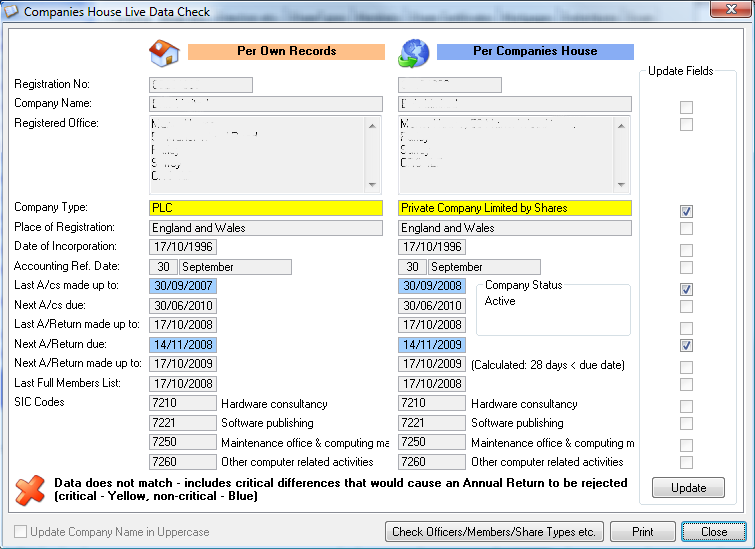
A window will open, comparing the data held within the software with that held at Companies House and highlighting any differences in yellow. You can optionally update your own data for any of the yellow fields.
In order to view a list of recent filings at Companies House for this company, simply select the "Recent Filing History" tab.
Clicking on the "Check Officers/Members/Share Types etc." button will allow you to check detailed information (requires e-filing module and company being checked must have a valid CAC code entered.
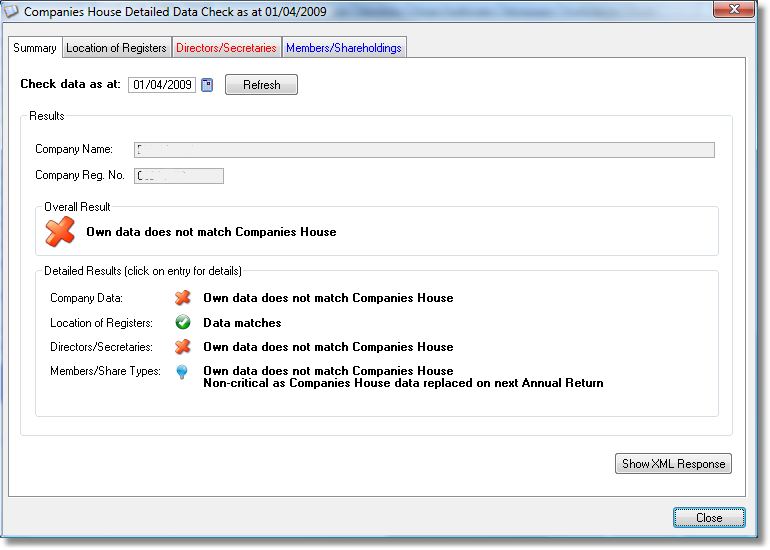
Inserting a new company
When you insert a new company, you will be prompted as to whether you wish to import the "Basic Company Data" from Companies House.
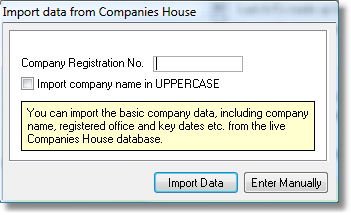
To import, just enter the company registration number and click "Import Data" button. If the company is found, the information will automatically be inserted into the Company Info tab data fields.