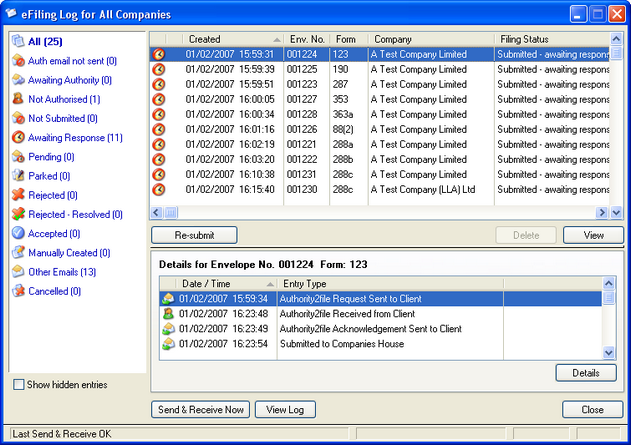
Whenever you eFile a form, the instruction is allocated a unique Companies House "Envelope Nuumber" and an entry is made in the eFiling log.
By highlighting an instruction in the top section, the details of that instruction are displayed in the bottom section. You can also filter which instructions are displayed by clicking the relevant status type in the top left frame.
If the eFiling log is opened from within the Company Info screen of a company, then the details shown will relate only to that company (plus all "Other Emails" - see below). If opened from the Company List screen, the log will display all entries for all companies.
Not Submitted
When an e-Filing instruction is produced by the software it is allocated a unique "Envelope Number" and an entry placed in the eFiling log with a status of "Not Submitted".
Submitted - Awaiting response
When the instruction is submitted to Companies House (either from the originating workstation or by another workstation or eFiling server), the header entry in the top right hand section of the screen will change to "Submitted - Awaiting response" a "Submitted" entry will appear in the details section below.
Document Processing Pending
The first response from Companies House will be a "Document processing pending" response which indicates that the eFiling instruction has been received by them and is pending processing. The status of the header will change accordingly and a new detail entry will appear. If processing by Companies House is delayed you may receive subsequent pending responses.
Parked - pending supply of further information
If Companies House receive an eFiling instruction that requires you to submit further information, you will receive a "Parked - pending supply of further information" response which will also give you information as to the further information required. The instruction will remain at this status level until the information is supplied to and processed by Companies House.
Accepted or Rejected
Once Companies House have processed the eFiling you will receive a response indicating either that it is Accepted or Rejected. If "Rejected" then you can read the reasons for the rejection by highlighting the Rejected detail entry and clicking the "Details" button. Once an eFiling is rejected it will remain rejected and a brand new instruction must be sent in due course once you have put right the reason for the rejection. In case of query regarding a rejection, Companies House will have indicated their contact details and preferred method of communication in the rejection response.
Rejected - Resolved
Once you have resolved the reason for the rejection, you can highlight the rejected entry and click the resolved button which merely marks the entry as "Rejected - Resolved". Marking it in this way does not actually resolve the problem but is intended as a way of removing entries from the list of "Rejected" items once you have resolved them and submitted a new instruction.
Other Emails
From time to time emails may be received into the email account being used for eFiling that are not responses from Companies House relating to eFiling instructions. Any such emails received will be saved (excluding any attached files). These emails will not be attributable to any particular company and will be described as "Other Emails". Such emails can be highlighted and deleted.
Actions:
| • | Send & Receive Sends all entries waiting to be sent and receives any emails that are waiting to be retrieved in the POP mailbox. |
| • | Send & receive Log Displays a log of recent "Send & receive" activity since the software was started. |
| • | Print Summary Prints a summary of displayed entries. |